Spatiotemporal data-driven Zoning plugin (SZ)
See also
You can find the plugin repository here
Introduction
This repository contains the code for a QGIS plugin, called “Spatiotemporal data-driven Zoning plugin” (SZ-plugin), aiming at creating maps of susceptibility to various natural forcing elements.
The plugin has been developed with a main focus and application towards landslides susceptibility, but it can be applied to different types of natural events or inter-disciplinary applications.
The plugin uses several type of statistical, machine learning models for susceptibility evaluation, such as:
Generalized Additive Model with two distributions: Binomial, Gaussian (see pygam)
Decision Tree (see scikit-learn)
Support Vector Machine (see scikit-learn)
Random Forest (see scikit-learn)
Multi-layer Perceptron as classifier (see scikit-learn) and regressor (see scikit-learn)
The plugin allows the user to perform spatial and temporal analysis implementing space-time cross-validation (CV) methods:
Kfold CV (see scikit-learn)
Spatial CV (see Elia et al., 2023)
Time Series Split temporal-CV (see scikit-learn)
Leave One Out temporal-CV (see scikit-learn)
Space-time CV (Leave One Out/Spatial CV)
Moreover the plugin allows the user to run space-time transferability with all the models implemented.
Installation
Minimum requirements
Tested on:
Ubuntu 20.04 - QGIS 3.34
Ubuntu 22.04 - QGIS 3.34
Windows 10 - QGIS 3.28/QGIS 3.34
MacOS Sonoma 14.4 - QGIS 3.28
Download and install
The plugin can be downloaded and installed directly from the official QGIS repository.
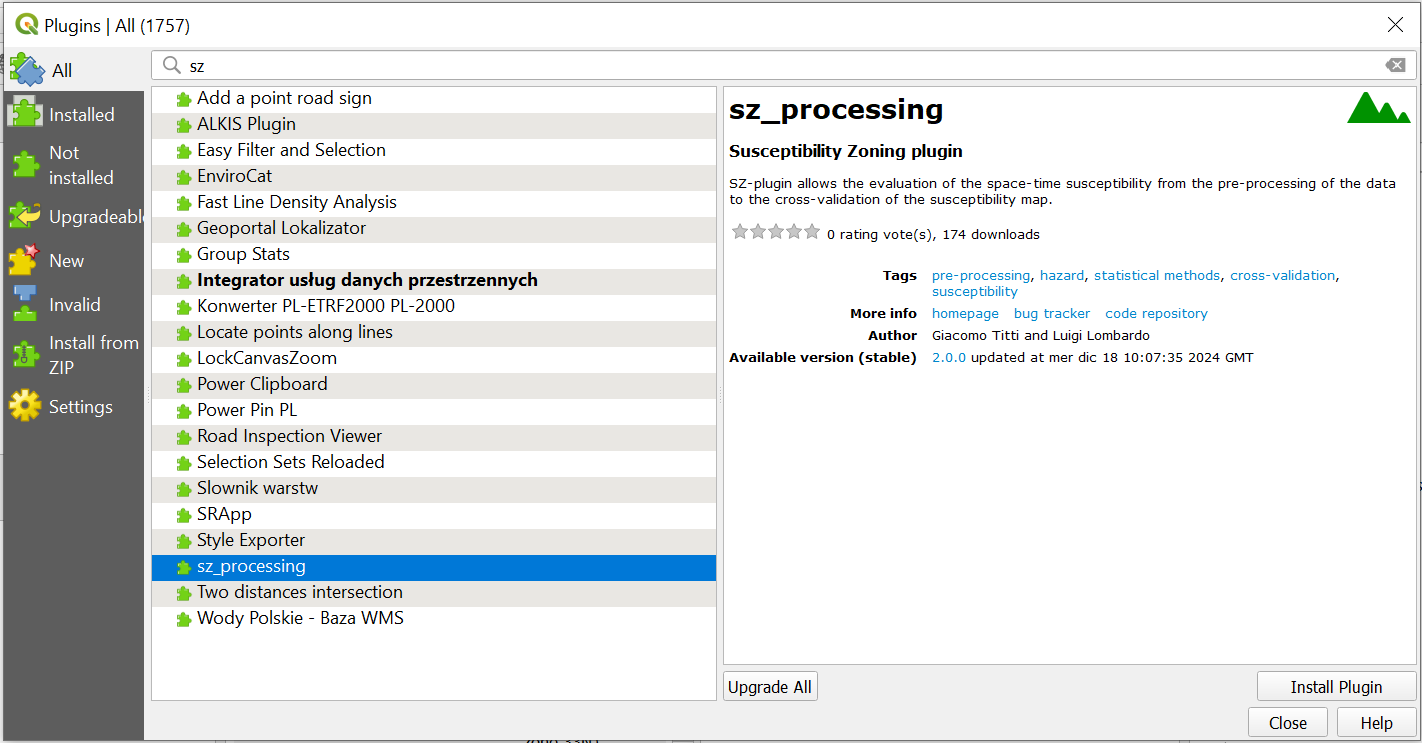
Alternative installation
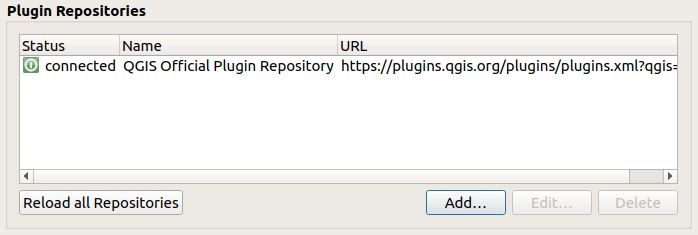
It can be installed on QGIS >= 3.28 adding the Plugin Repository to QGIS manage and install plugins:
add plugin repository
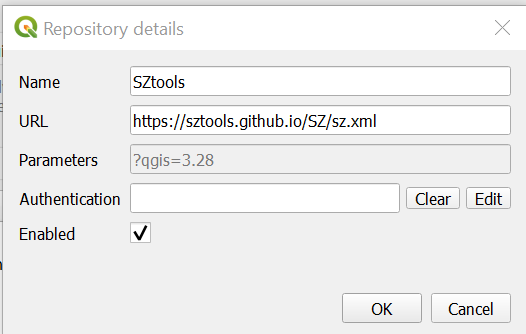
edit repository and add https://sztools.github.io/SZ/sz.xml
or
cloning the GitHub repository or downloading it as zip file (and than unzipping it) and copying the sz_module folder in your local python/plugin folder (read here for more information).
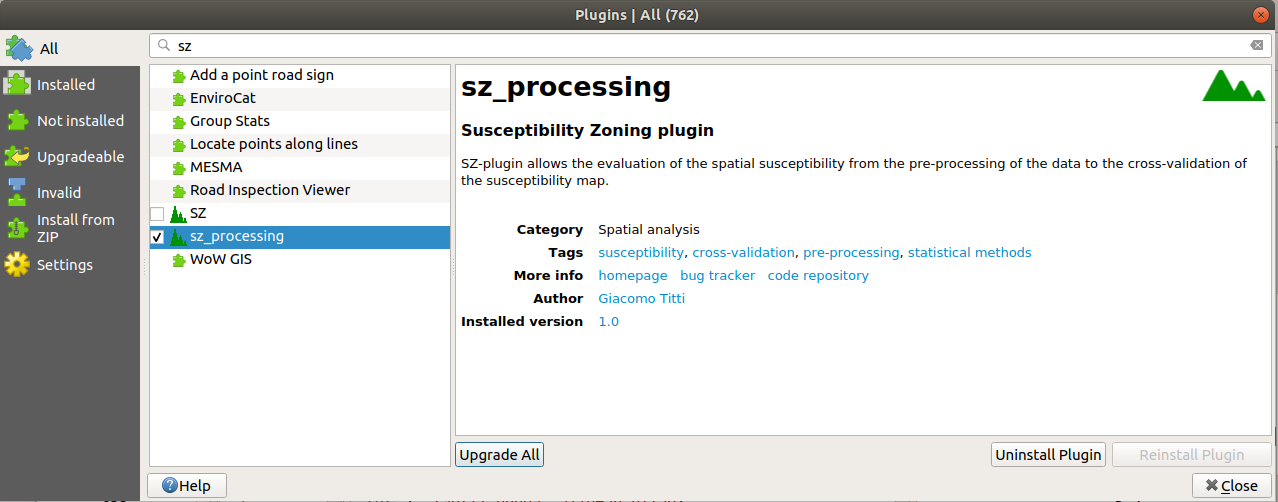
Lunch QGIS 3.x, and abilitate the plugin from manage and install plugin/installed/sz_processing
or
cloning the GitHub repository or downloading it as zip file (and than unzipping it), and zip the folder sz_module to sz_module.zip. Finally you can install the plugin by using the menu install from zip.
At the end you should have the SZ plugin in your processing toolbox
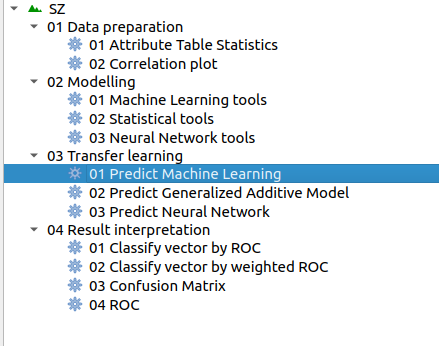
GUI
The functions are grouped into 4 cathegories:
Data preparation
Modelling
SI transfer
Classify SI
Data preparation functions can be used for data pre-processing
Modelling functions run the statistic models (Statistical tools) and machine learning models (Machine Learning tools/Neural Network tools) for susceptibility, cross-validate and evaluate the results by several metrics: ROC (AUC), F1 score, Choen’s kappa index, Root Meet Square Error, Mean Absolute Error, Squared R, Pearson Correlation
SI transfer functions run the statistic models (Statistical tools) and machine learning models (Machine Learning tools/Neural Network tools) for susceptibility, and apply transfer learning in time and space.
Classify SI functions allows the user to cathegorize the susceptibility index, to run ROC analysis and to perform Confusion Matrix.
All the functions run vector analysis
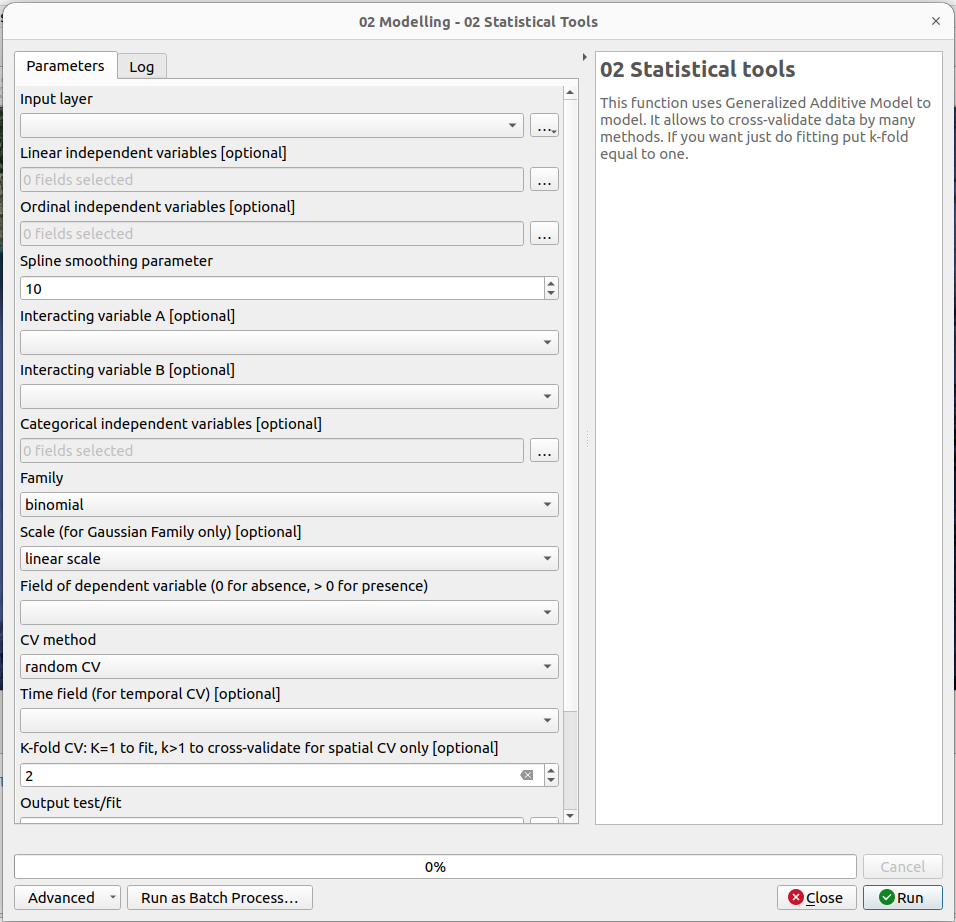
Usage
#.. toctree:: # :maxdepth: 2
# Modelling - Machine Learning tools <#modelling-machine-learning-tools> # Modelling - Statistical Tools <#modelling-statistical-tools> # Modelling - Neural Network Tools <#modelling-neural-network-tools>
Modelling - Machine Learning tools
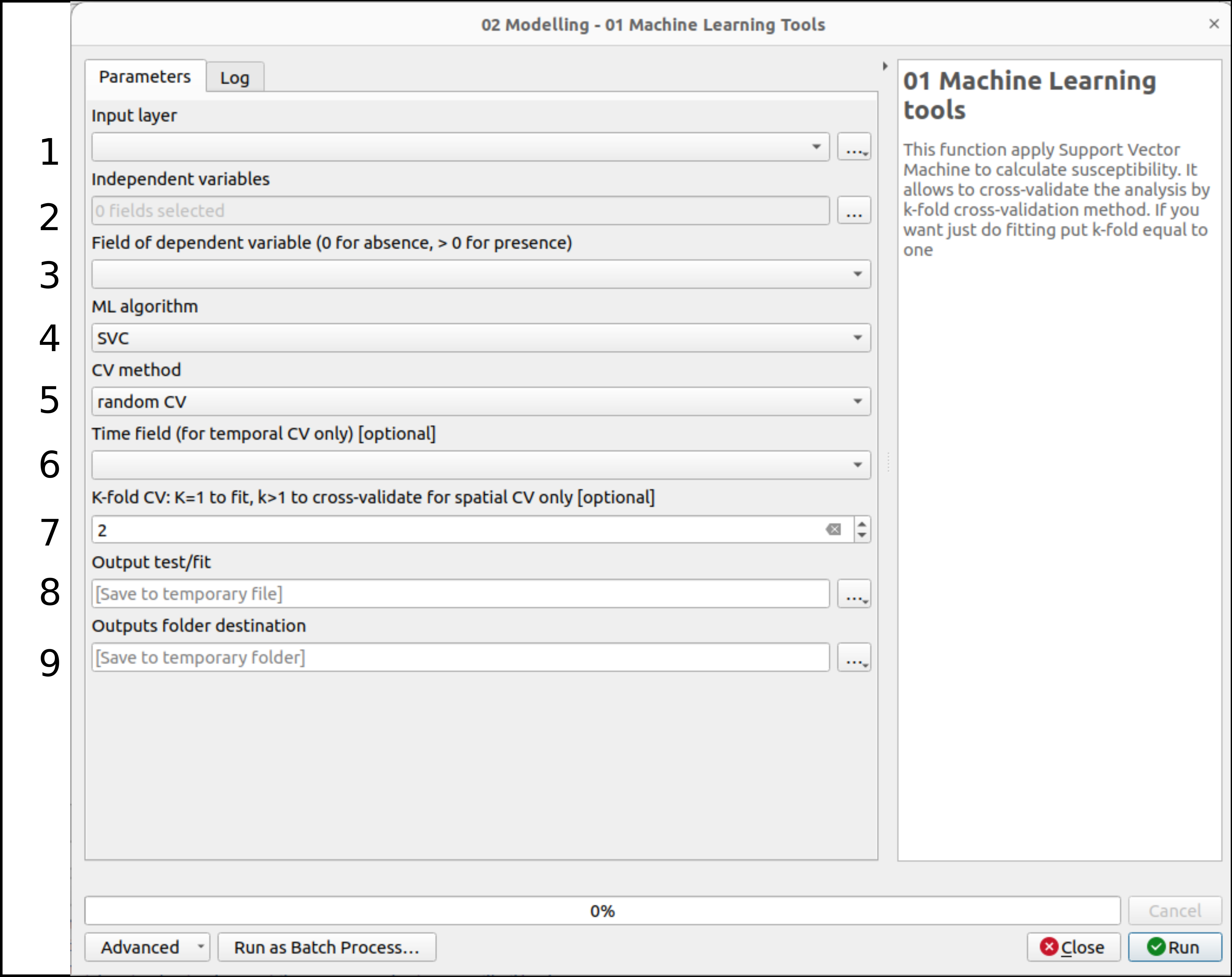
1 select the vecor layer to be used as parent layer in the variable selection
2 select the independent variabled from the fields of the input layer. Possible format: linear, ordinal (spline fitted), tensors, cathegorical (integer and continuous from 1 to n)
3 select the dependent variable. In case of bionomial selection the variable is 0/1, otherwise an ordinal n_1…n_m
4 select the algorithm: SVC, DT, RF
5 select one of the possible CV method
6 in case of TSS or LOO or space-time CV selection the Time field is necessary
7 K value selection in case of random, spatial and space-time CV. If k is equal to 1 then a fitting analysis will be conducted
8 set the vector file destination
9 set the folder destination for the weights, partial effects, plots and metrics outputs
Modelling - Statistical Tools
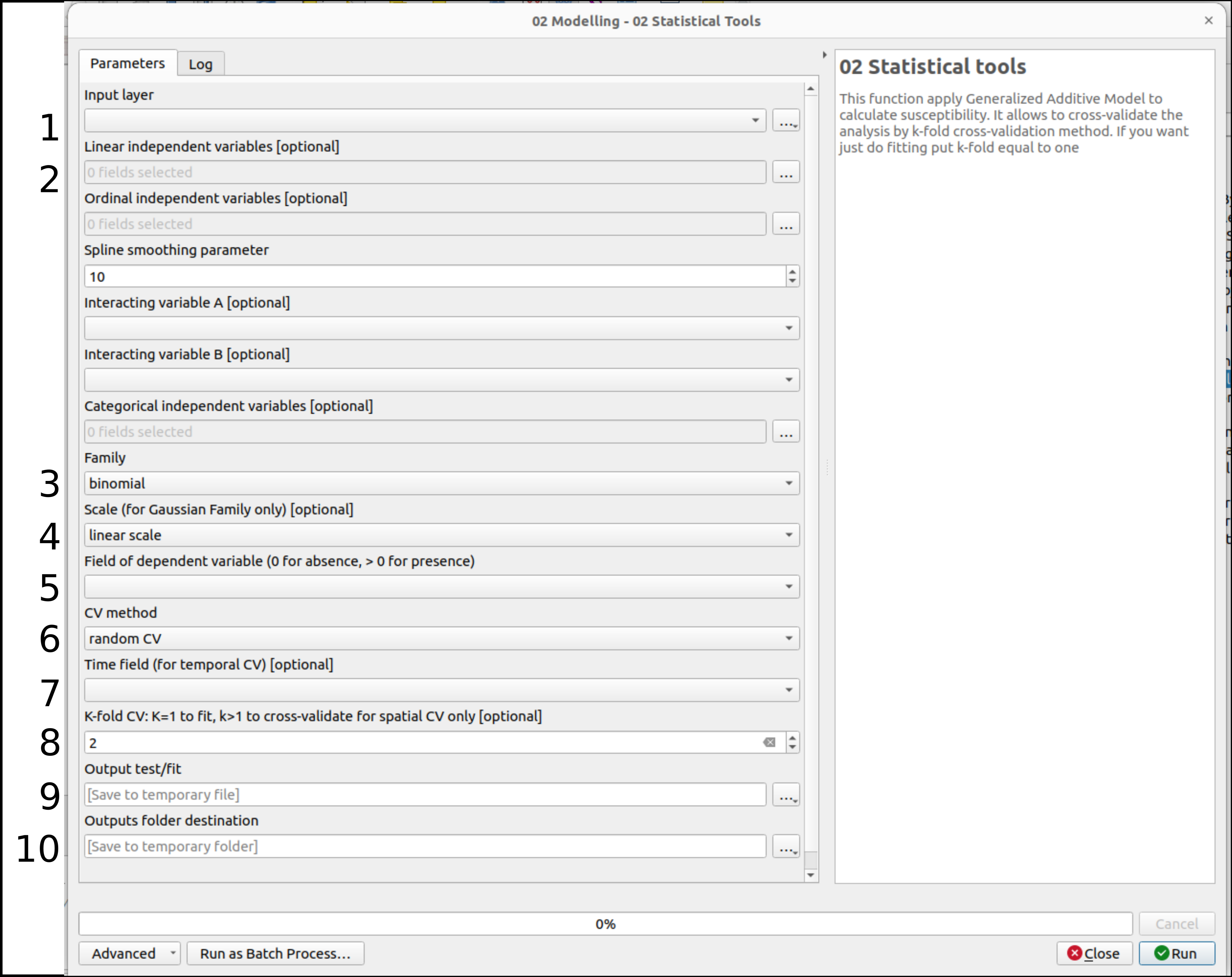
1 select the vecor layer to be used as parent layer in the variable selection
2 select the independent variabled from the fields of the input layer. Possible format: linear, ordinal (spline fitted), tensors, cathegorical (integer and continuous from 1 to n)
3 select the distribution: gaussian or binomial
4 if the distribution selected is binomial, all the variables are scaled with a standard scaler. The scale selection is necessary only for gaussian distribution: linear (standard scaler) or logaritmic
5 select the dependent variable. In case of bionomial selection the variable is 0/1, otherwise an ordinal n_1…n_m
6 select one of the possible CV method
7 in case of TSS or LOO or space-time CV selection the Time field is necessary
8 K value selection in case of random, spatial and space-time CV. If k is equal to 1 then a fitting analysis will be conducted
9 set the vector file destination
10 set the folder destination for the weights, partial effects, plots and metrics outputs
Modelling - Neural Network Tools
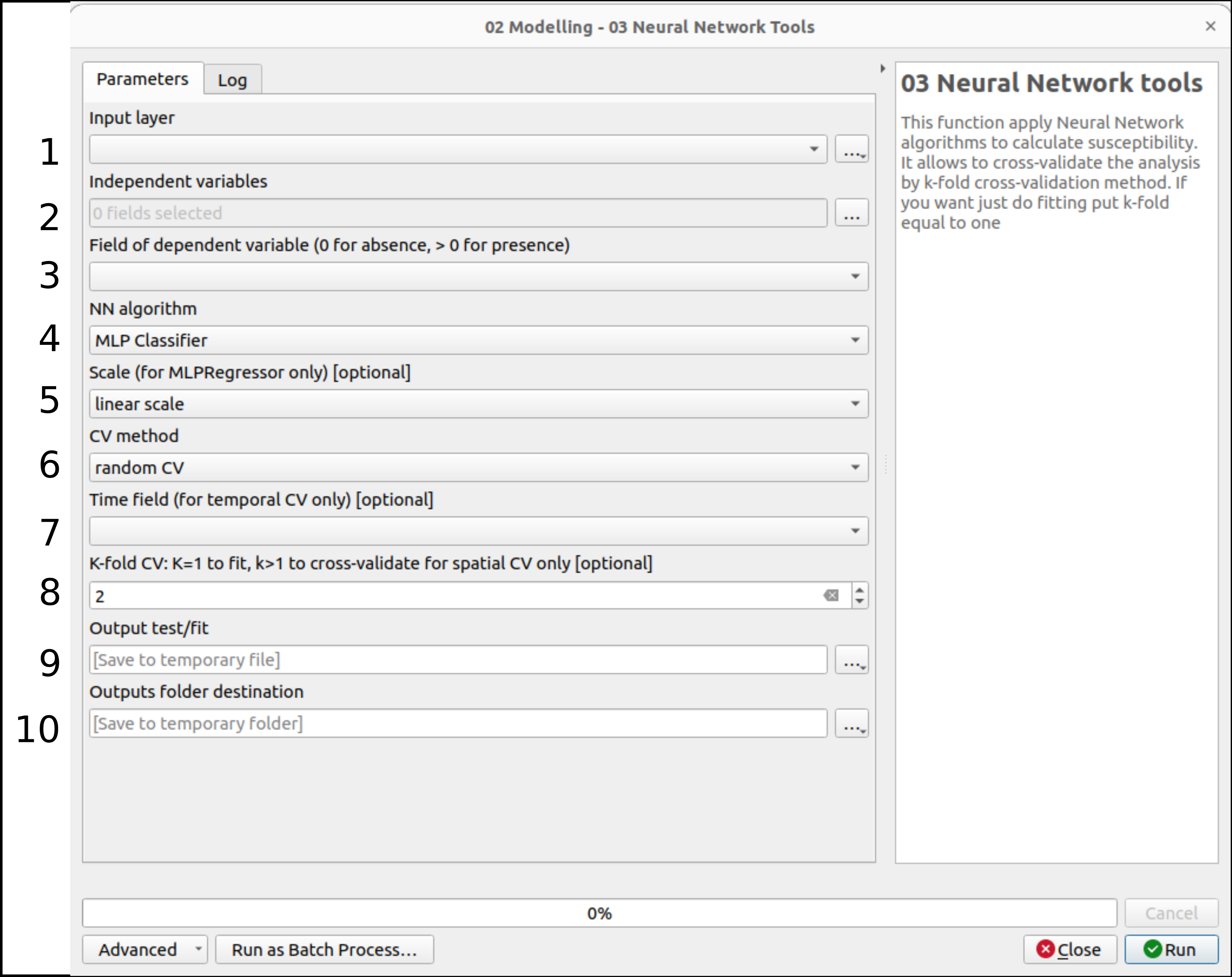
1 select the vecor layer to be used as parent layer in the variable selection
2 select the independent variabled from the fields of the input layer. Possible format: linear, ordinal (spline fitted), tensors, cathegorical (integer and continuous from 1 to n)
3 select the dependent variable. In case of bionomial selection the variable is 0/1, otherwise an ordinal n_1…n_m
4 select the algorithm: MLP classifier or MLP regressor
5 if the distribution selected is MLP classifier, all the variables are scaled with a standard scaler. The scale selection is necessary only for MLP regressor: linear (standard scaler) or logaritmic
6 select one of the possible CV method
7 in case of TSS or LOO or space-time CV selection the Time field is necessary
8 K value selection in case of random, spatial and space-time CV. If k is equal to 1 then a fitting analysis will be conducted
9 set the vector file destination
10 set the folder destination for the weights, partial effects, plots and metrics outputs
Test
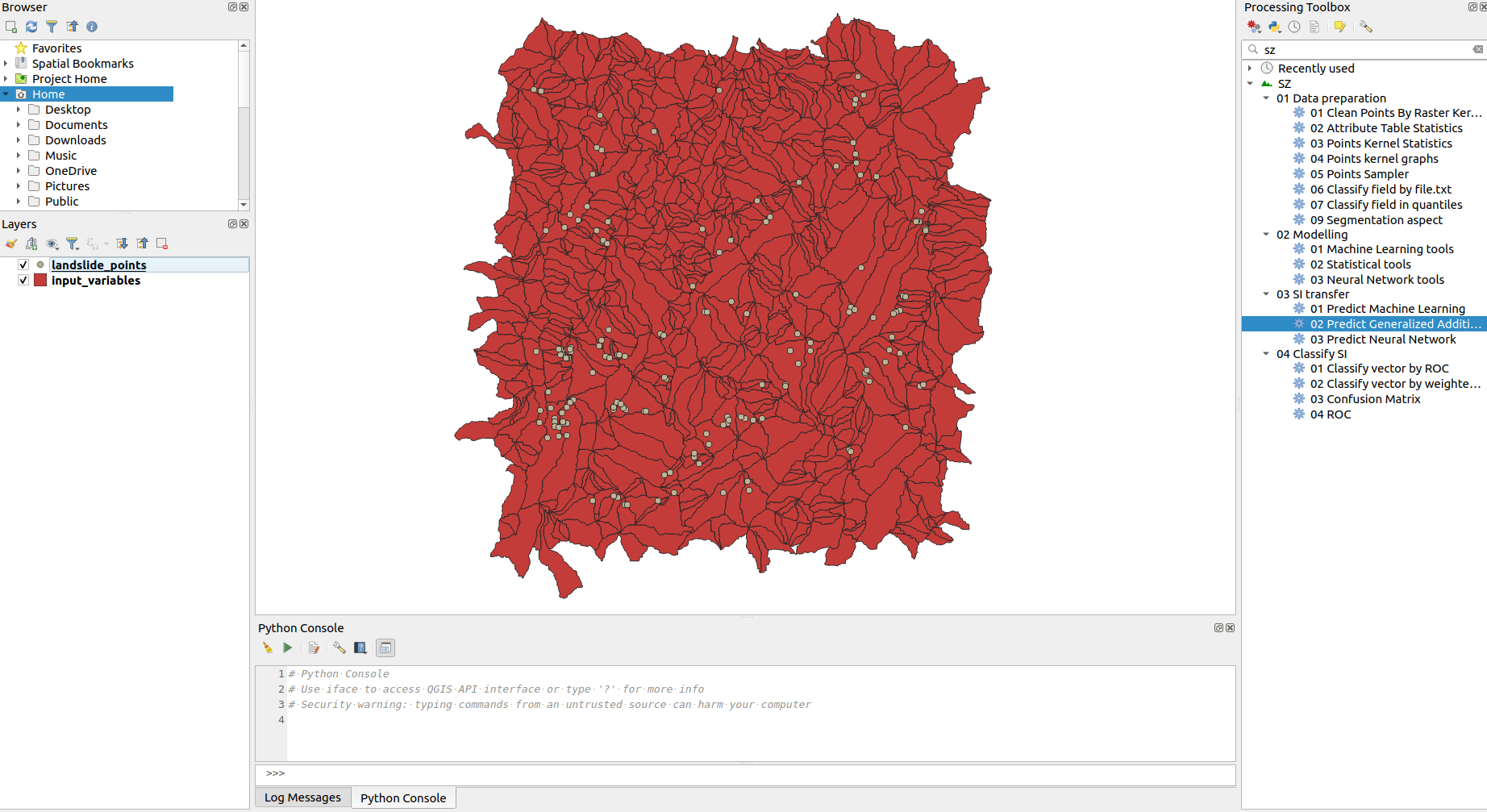
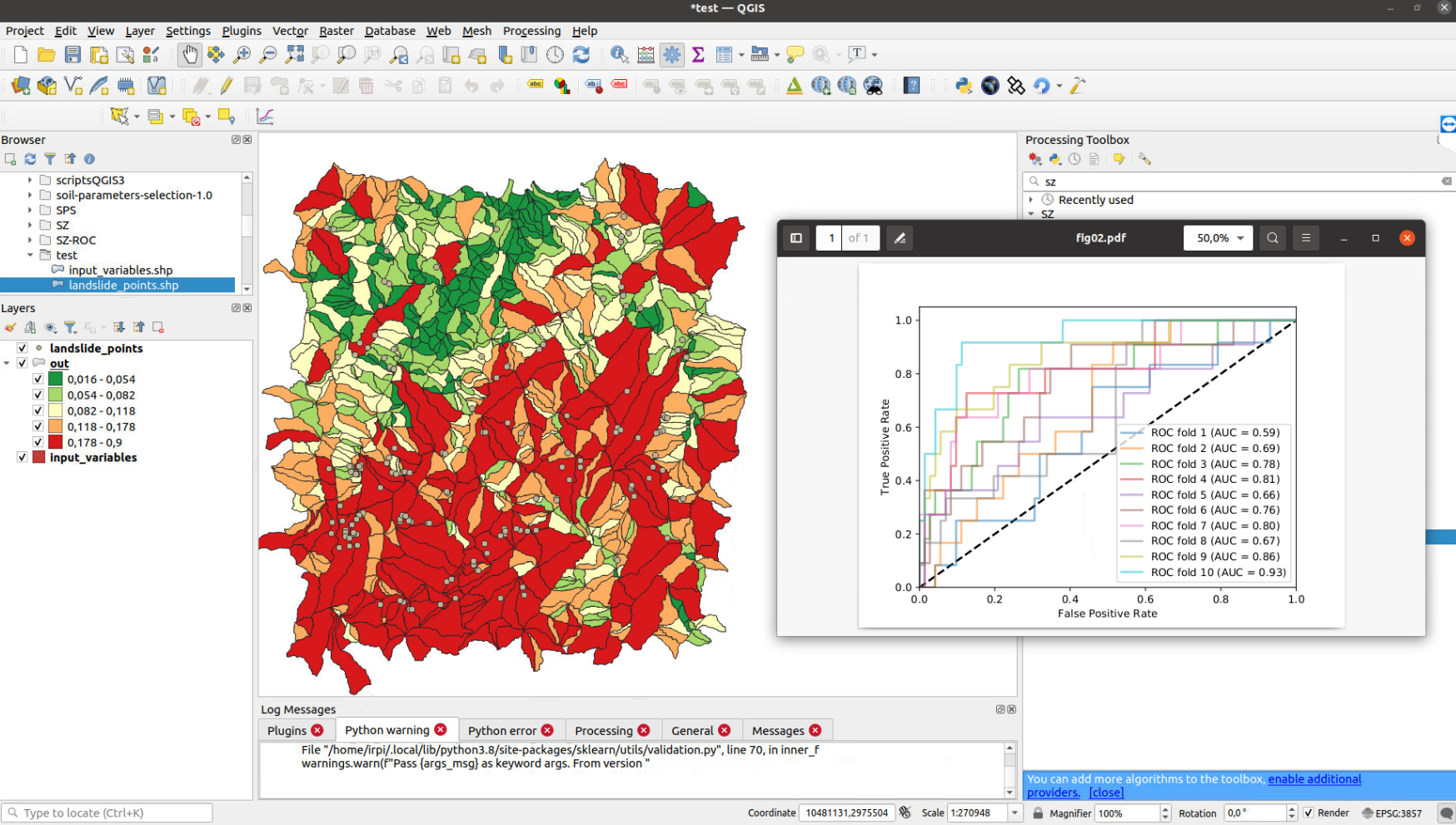
A dataset and QGIS project are available in test folder to test the plugin.
Third-part libraries and plugins used
pygam
pandas
shapely
fiona
seaborn
Tutorial
video tutorial SZ v1.x: https://www.youtube.com/watch?v=XpsiCkVF11s
Application
Titti G, Sarretta A, Lombardo L, Crema S, Pasuto A and Borgatti L (2022) Mapping Susceptibility With Open-Source Tools: A New Plugin for QGIS. Front. Earth Sci. 10:842425. doi: 10.3389/feart.2022.842425
Publications
A few examples and references about applications
Titti G, Sarretta A, Lombardo L, Crema S, Pasuto A and Borgatti L (2022) Mapping Susceptibility With Open-Source Tools: A New Plugin for QGIS. Front. Earth Sci. 10:842425. doi: 10.3389/feart.2022.842425
Titti, G., van Westen, C., Borgatti, L., Pasuto, A., & Lombardo, L. (2021). When Enough Is Really Enough? On the Minimum Number of Landslides to Build Reliable Susceptibility Models. Geosciences, 11(11), 469.
Titti, G., Borgatti, L., Zou, Q., Cui, P., & Pasuto, A. (2021). Landslide susceptibility in the Belt and Road Countries: continental step of a multi-scale approach. Environmental Earth Sciences, 80(18), 1-18. 10.1007/s12665-021-09910-1
Titti, G., Borgatti, L., Zou, Q., Pasuto, A., 2019. Small-Scale landslide Susceptibility Assessment. The Case Study of the Southern Asia. Proceedings 30, 14. 10.3390/proceedings2019030014
Presentations
A list of presentations made about the plugin and its applications
Titti, Giacomo, Sarretta, Alessandro, Crema, Stefano, Pasuto, Alessandro, & Borgatti, Lisa. (2020, March). Sviluppo e applicazione del plugin Susceptibility zoning per il supporto alla pianificazione territoriale. Zenodo. 10.5281/zenodo.3723353
Credits
v1.x: Giacomo Titti, Alessandro Sarretta and Luigi Lombardo, Padova, November 2021
please cite: Titti G, Sarretta A, Lombardo L, Crema S, Pasuto A and Borgatti L (2022) Mapping Susceptibility With Open-Source Tools: A New Plugin for QGIS. Front. Earth Sci. 10:842425. doi: 10.3389/feart.2022.842425
v2.x: Giacomo Titti, Luigi Lombardo, Liwei Hu, Pietro Festi, Letizia Elia, Bologna, December 2024
please cite: Titti, G., Hu, L., Festi, P., Elia, L., Borgatti, L. & Lombardo, L. (2025). An updated version of the SZ-plugin: from space to space-time data-driven modeling in QGIS. EarthArxiv, Preprint. doi: 10.31223/X5JD9X
Contacts
If you have any problem, please write to giacomotitti@gmail.com or create new issue here